Securing Google Cloud: The MVSP Checklist Guide
Google Cloud MVSP defines 60 controls across 6 domains for a minimum security baseline. Use an open-source tool to learn and track your progress.
Google Cloud just published its Minimum Viable Secure Platform (MVSP) - a structured, opinionated security checklist that every organization running workloads on their platform should implement. This is not a compliance framework per se (although I won't be surprised to see it in their Compliance Manager product soon), rather a distillation of Google's own best practices into concrete, implementable controls. Let's dive into it.
What is Minimum Viable Security Platform (MVSP)?
Cloud misconfigurations and weak identity and access management (IAM) controls remain the most common causes of security incidents in the cloud. To address this, Google Cloud published the Well-Architected Framework, with the Security, Privacy, and Compliance pillar intended to offer specific insights for security professionals and engineers. However, while the guidance has always been comprehensive, the general sentiment is that it is not opinionated enough for newcomers to the platform. The MVSP fills this gap with aplomb.
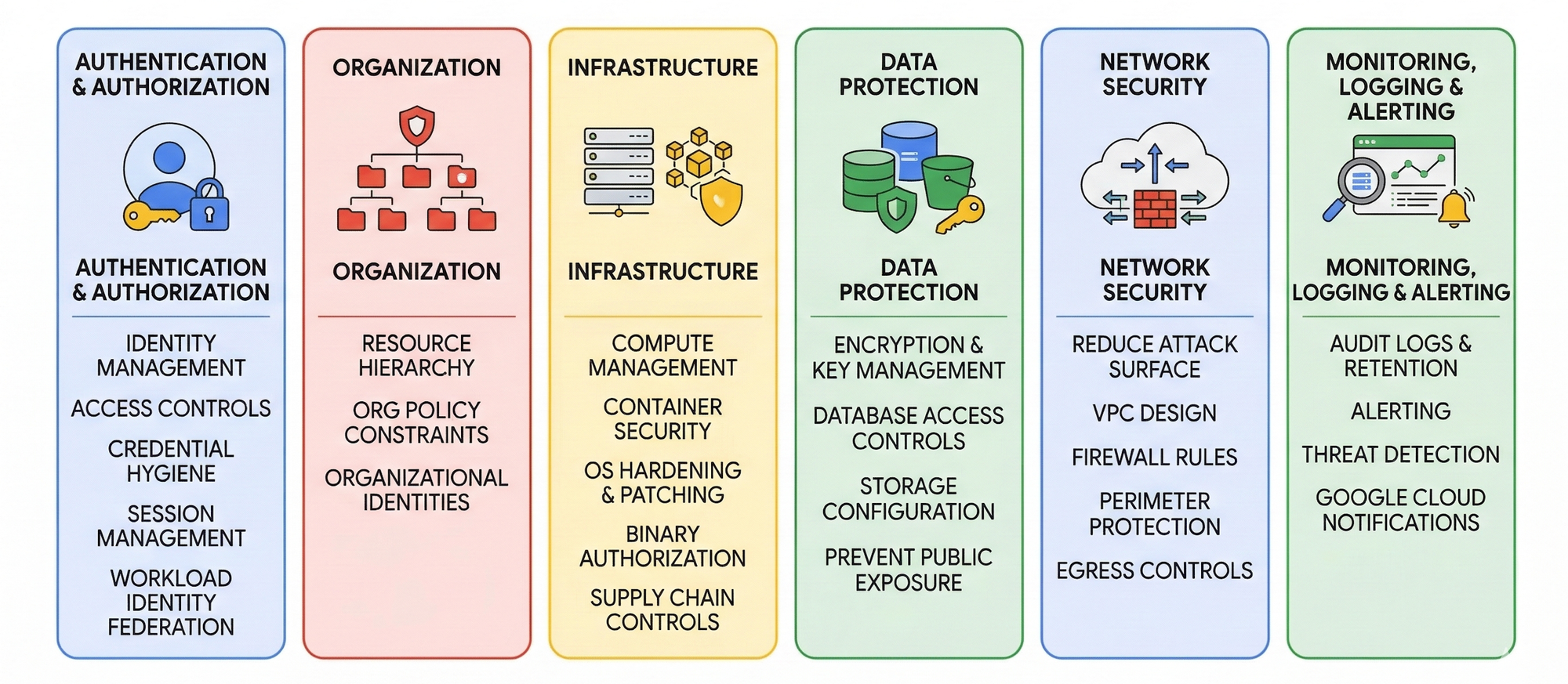
The checklist spans 60 controls across six domains, organized into three implementation levels - Basic, Intermediate, and Advanced - so you can adopt the controls progressively. The controls are directly linked to specific Google Cloud products and services, making them something you can configure, not just an abstract concept.
Authentication and Authorization (20 controls)
Covers identity management, access controls, credential hygiene, session management, and Workload Identity Federation. This is where most incidents originate, and where Google rightly spends the most time. Controls range from MFA enforcement and phishing-resistant authentication at the Basic level, through to fine-grained IAM conditions and workload identity at the Advanced level.
Organization (3 controls)
The smallest domain, but foundational in nature. Covers resource hierarchy, organization policy constraints, and a focus on organizational identities instead of personal Google accounts.
Infrastructure (18 controls)
Covers both compute resource management and container security. Includes OS hardening, patch management, binary authorization, GKE cluster configuration, and supply chain controls for container images (from build to runtime).
Data Protection (5 controls)
Addresses encryption, key management, and database and storage access controls. Includes customer-managed keys, bucket configuration, and preventing public exposure via misconfigurations.
Network Security (7 controls)
Focuses on reducing attack surface at the network layer. Covers VPC design, firewall rules, private access, perimeter protection, and egress controls for data exfiltration prevention via DNS or non-Google endpoints.
Monitoring, Logging and Alerting (7 controls)
Finally, this domain ensures you have sufficient visibility to detect and respond to threats. Covers audit logs and alerting, log retention, Security Command Center, and Google Cloud advisory notifications.
Self-Service Dashboard for Tracking MVSP Progress
To make this 60-item checklist more practical for practitioners, I built a self-container web application that brings the entire checklist to life in a single HTML file - no backend, no login, no installation. See the demo here.
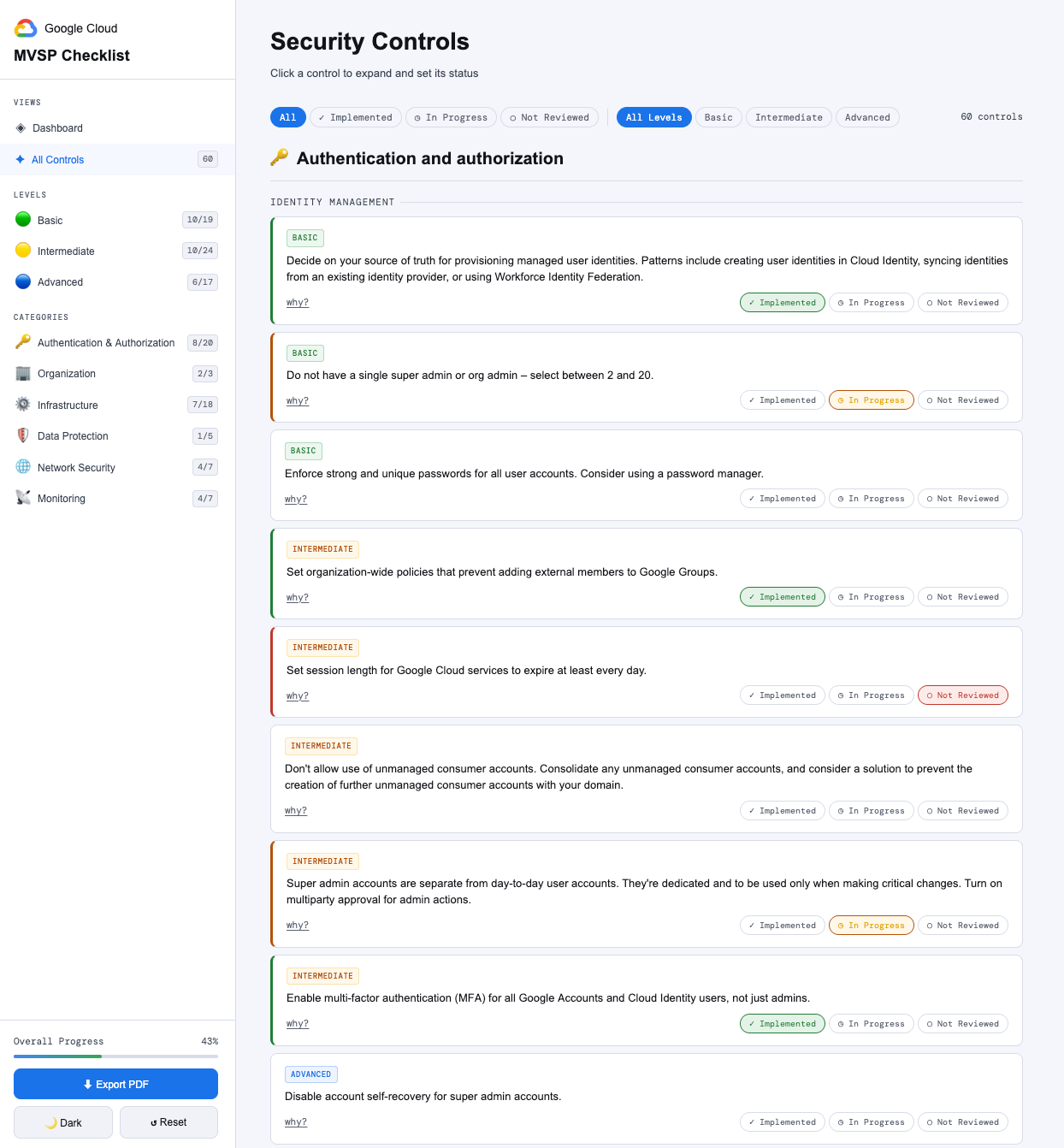
The tool offers:
- 60 controls across
Authentication & Authorization,Organization,Infrastructure,Data Protection,Network Security, andMonitoringdomains - 3 status states per control —
Implemented,In Progress,Not Reviewed - Live dashboard with progress charts by
Level,Category, andSub-category - Filters by status and level (
Basic/Intermediate/Advanced) - Sidebar navigation with real-time reviewed/total badges for all Levels and Categories
- Notes per control, saved instantly as you type
- PDF export capturing all statuses, notes, and dashboard charts
- Light & dark mode with preference saved to localStorage
- Zero dependencies — no backend, no build step, no database
Getting Started with Google Cloud MVSP
- Review the official Google Cloud MVSP documentation to understand the intent behind each domains, and the underlying controls.
- Download the PDF checklist as a handy reference.
- Clone or download my GitHub repo, and open the HTML file in your browser. Alternatively, deploy the repo to Google Cloud, Railway, DigitalOcean etc.
- Optionally, fork the repo and add persistence via SQLite for long-term use.