Deploying Google ADK Agents to Vertex AI Agent Engine with Agent Identity
Step-by-step guide to deploying Google ADK agents on Vertex AI Agent Engine with Agent Identity—covering setup, IAM permissions, and when to use it in production.
If you've deployed agents to Vertex AI Agent Engine before, you've likely used service accounts to handle authentication and access management. Google Cloud recently introduced a better approach: Agent Identity. Instead of sharing service accounts across multiple agents, each agent now gets its own unique identity that's tied to its lifecycle. Let's explore this topic in more detail.
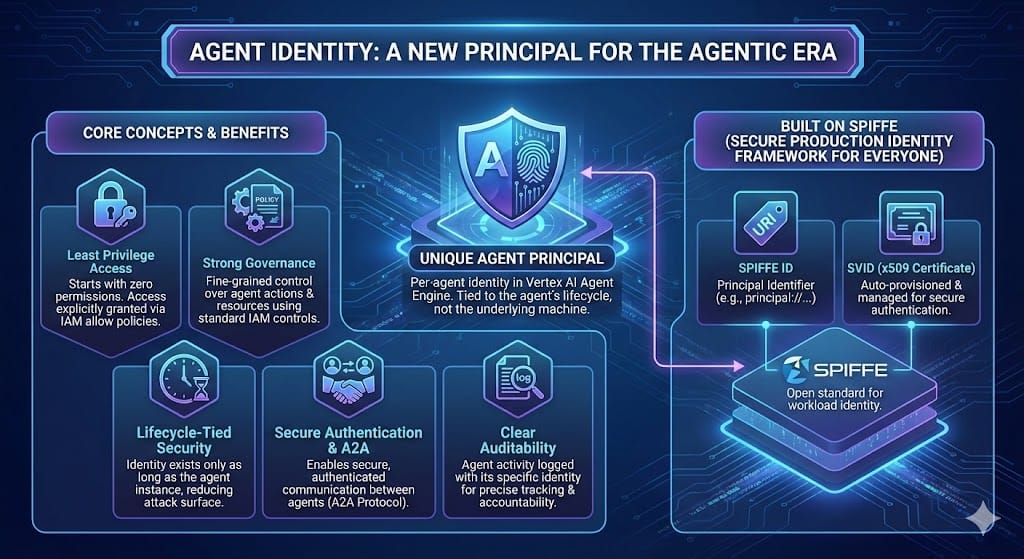
What is Agent Identity?
Based on the emerging SPIFFE standard, Agent Identity is a brand new Google Cloud IAM principal type, specially crafted for the exploding world of agents. The key difference from service accounts: your agent starts with zero permissions. You explicitly grant only what the agent needs, and when you delete the agent, the identity disappears with it.
Agent Identity generates a unique principal identifier that follows the format:
principal://TRUST_DOMAIN / NAMESPACE / AGENT_NAMEHere is an example agent identity tied to an organization:
principal://agents.global.org-ORGANIZATION_ID.system.id.goog/resources/aiplatform/projects/PROJECT_NUMBER/locations/LOCATION/reasoningEngines/AGENT_ENGINE_IDThis identity is automatically provisioned when you deploy your agent with the AGENT_IDENTITY flag. Under the hood, Google Cloud creates a trust domain for your organization (or project if you don't have an org), manages x509 certificates for secure authentication, and ties everything to your specific agent instance.
Why Use Agent Identity?
- Least privilege by default. Service accounts often accumulate permissions over time as they're shared across projects. Agent Identity forces you to be intentional about what each agent can access.
- Better security boundaries. Each agent has its own identity, so compromising one agent doesn't give access to resources used by others.
- Simpler lifecycle management. Delete the agent, delete the identity. No orphaned service accounts to track down later.
- Built-in audit trails. Cloud Logging shows exactly which agent (and which user, if the agent is acting on someone's behalf) accessed what resources.
Deploying to Agent Engine
Let's walk through deploying a Google ADK agent with Agent Identity. The code is straightforward - you can find the complete source at my GitHub repository.
First, set up your environment variables. Create a .env file in your project directory for local development, or provide environment variables at runtime via Secret Manager for more robust security:
GOOGLE_GENAI_USE_VERTEXAI=True
GOOGLE_CLOUD_PROJECT="your-project-id"
GOOGLE_CLOUD_LOCATION="your-region"
GOOGLE_CLOUD_STORAGE_BUCKET="your-bucket-name"
GOOGLE_CLOUD_AGENT_ENGINE_ENABLE_TELEMETRY=True
OTEL_INSTRUMENTATION_GENAI_CAPTURE_MESSAGE_CONTENT=True
Your agent definition stays simple. Here's an extremely minimal example:
from google.adk.agents.llm_agent import Agent

root_agent = Agent(
    name='agent_id',
    model='gemini-2.5-flash-lite',
    instruction='Answer user questions to the best of your knowledge',
)
The deployment script is where you specify Agent Identity. Note that this feature is only available in v1beta1 API version at the moment.
import os
from dotenv import load_dotenv
import vertexai
from vertexai import agent_engines, types

def main():
    load_dotenv()

    project_id = os.getenv("GOOGLE_CLOUD_PROJECT")
    location = os.getenv("GOOGLE_CLOUD_LOCATION")
    bucket = os.getenv("GOOGLE_CLOUD_STORAGE_BUCKET")

    client = vertexai.Client(
        project=project_id,
        location=location,
        http_options=dict(api_version="v1beta1")
    )

    remote_agent = client.agent_engines.create(
        agent=root_agent,
        config={
            "display_name": root_agent.name,
            "identity_type": types.IdentityType.AGENT_IDENTITY,
            "requirements": [
                "google-adk (>=1.19.0)",
                "google-cloud-aiplatform[agent_engines] (>=1.128.0,<2.0.0)",
                "google-genai (>=1.52.0,<2.0.0)",
                "pydantic (>=2.10.6,<3.0.0)",
            ],
            "extra_packages": [f"./{root_agent.name}"],
            "staging_bucket": f"gs://{bucket}",
        },
    )

    print(f"✅ Deployed agent: {remote_agent.name}")
Run the deployment script to deploy the ADK agent on Agent Engine:
python -m agent_id.deployThe script outputs your agent's resource name. Copy this—you'll need it for the next step.
Granting IAM Permissions
Here's where Agent Identity differs most from service accounts. Your agent is deployed but can't do anything yet. You need to explicitly grant it permissions. At minimum, most agents need two roles:
roles/aiplatform.expressUserfor inference, sessions, and memoryroles/serviceusage.serviceUsageConsumerto use project quota
Replace the placeholders in these commands with your actual values:
export PRINCIPAL="principal://agents.global.org-ORG_ID.system.id.goog/resources/aiplatform/projects/PROJECT_NUMBER/locations/LOCATION/reasoningEngines/AGENT_ENGINE_ID"

gcloud projects add-iam-policy-binding PROJECT_ID \
    --member="$PRINCIPAL" \
    --role="roles/aiplatform.expressUser"

gcloud projects add-iam-policy-binding PROJECT_ID \
    --member="$PRINCIPAL" \
    --role="roles/serviceusage.serviceUsageConsumer"
Give IAM about a minute to propagate these changes. After that, your agent should be ready to handle requests. If your agent needs to call other Google Cloud APIs (Vision API, Cloud Storage, etc.), grant those permissions the same way. Just replace the role name with whatever your agent needs.
Should You Use Agent Identity?
Agent Identity is currently recommended for test environments only. Google is still working through some edge cases, particularly around organization policies with domain restricted sharing. If your organization has strict IAM policies that reference memberInPrincipalSet or use iam.allowedPolicyMemberDomains, you might run into permission issues. Also, agent identities can't be granted legacy Cloud Storage bucket roles. Use the newer predefined roles instead.
If you're starting a new project or testing agents in a development environment, Agent Identity is worth using. The security model is cleaner, and you'll appreciate the automatic cleanup when you delete agents. For production workloads with complex organizational policies, you might want to wait until Google marks the feature as generally available. But the direction is clear: per-agent identities are better than shared service accounts, and this is the future of agentic identity.