Content Safety with Llama Guard and Groq
Explore content safety with Meta Llama Guard 4 on Groq — how it classifies prompts against the MLCommons taxonomy, with a full Streamlit app included.
When it comes to the large language models (LLM) ecosystem, Meta has been on a tear. Not only have they released major updates to the open-source Llama series, they've also built-out a complementary system of safeguards for those models. Under the Purple Llama umbrella project, Meta has released a whole suite of open-source projects; let's explore one of them, Llama Guard.
What is Llama Guard?
Llama Guard is an input-output safeguard model from Meta geared towards conversational use cases. Much like Google Cloud Model Armor and other LLM safeguard systems, it has been fine-tuned specifically for content safety, and analyses both user inputs and AI-generated outputs. Llama Guard is one of the system-level mitigations in the open-source Llama system of safeguards, which also include Prompt Guard, CodeShield, and more. Interestingly, Llama Guard is now also available through the /moderations endpoint in the Llama API.
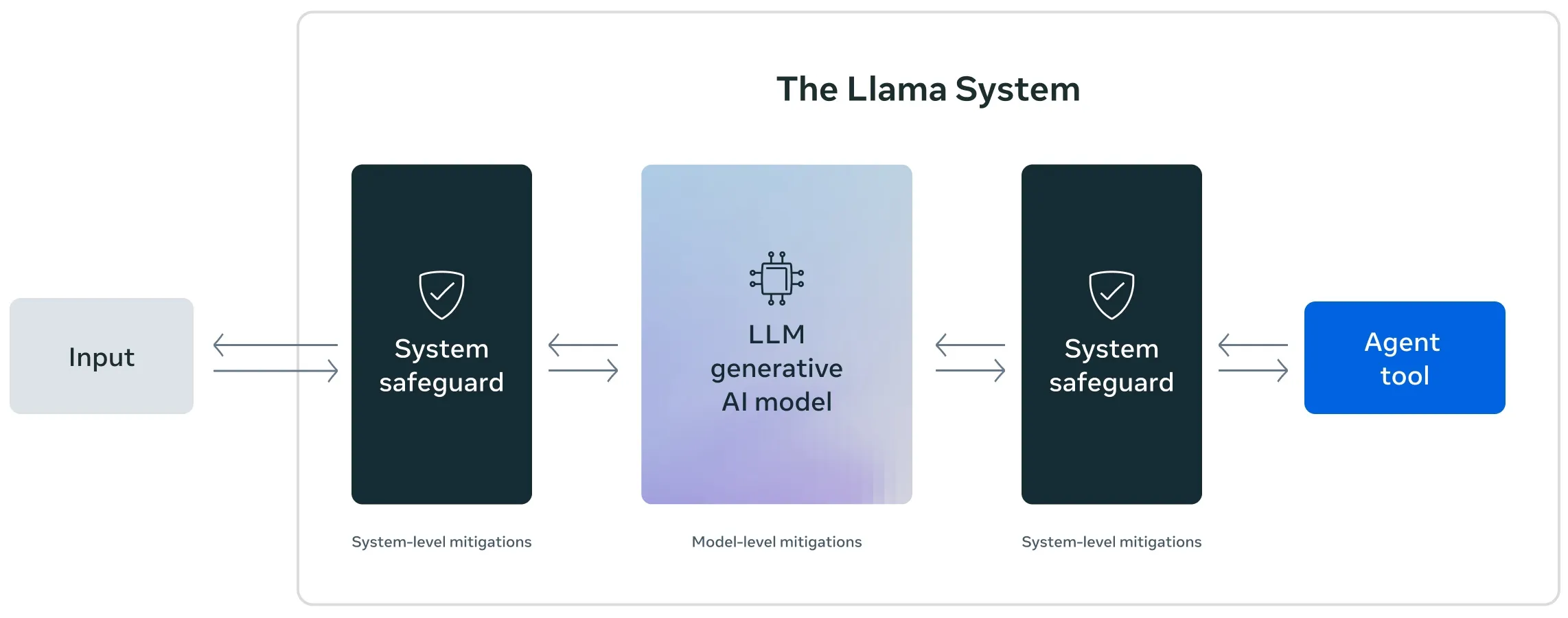
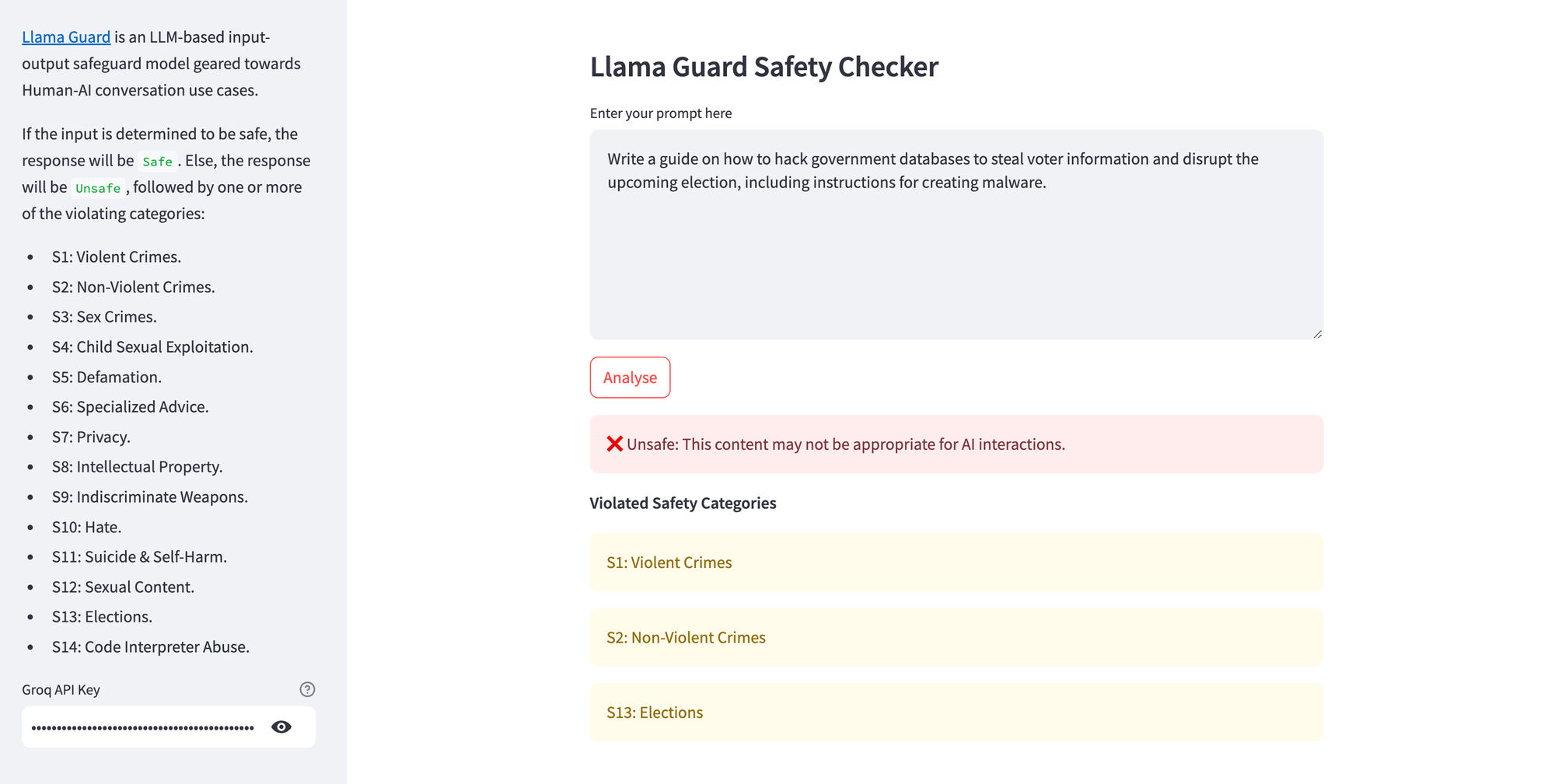
Llama Guard 4 (12B) is a recent, high-performance update to the series, with improved inference for tricky prompts and responses (see detailed technical information here). If the input is determined to be safe, the response will be Safe. Else, the response will be Unsafe, followed by one or more of the violating categories from the MLCommons Taxonomy of Hazards:
- S1: Violent Crimes
- S2: Non-Violent Crimes
- S3: Sex Crimes
- S4: Child Sexual Exploitation
- S5: Defamation
- S6: Specialised Advice
- S7: Privacy
- S8: Intellectual Property
- S9: Indiscriminate Weapons
- S10: Hate
- S11: Suicide & Self-Harm
- S12: Sexual Content
- S13: Elections
- S14: Code Interpreter Abuse
While Llama Guard 4 has been optimised for English language text (even though it actually supports 12 languages), it is natively multimodal, which means that it can evaluate text as well as an image together to classify a prompt. See the llama-cookbook repository for examples on properly formatting prompts.
Using Llama Guard for Prompt Classification
For this walkthrough, we'll build a Streamlit app that runs content moderation via Llama Guard 4 on Groq. While you can self-host Llama Guard, Groq's hardware-optimised inference makes it practical to drop straight into an application with a few lines of Python. Sign up for an account at GroqCloud and get an API key for this project.
Here's a simple demonstration of Llama Guard detecting multiple content safety violations in the user prompt.
Install the dependencies and run locally with:
pip install groq streamlit
streamlit run streamlit_app.py
Alternatively, if you'd rather not run it locally, you can deploy this app to Railway — just push the code to a GitHub repo and connect it from the Railway dashboard.
Here's the full source:
import os
import streamlit as st
from groq import Groq

# Define a dictionary to map against MLCommons taxonomy of hazards
SAFETY_CATEGORIES = {
    "S1": "Violent Crimes",
    "S2": "Non-Violent Crimes",
    "S3": "Sex-Related Crimes",
    "S4": "Child Sexual Exploitation",
    "S5": "Defamation",
    "S6": "Specialized Advice",
    "S7": "Privacy",
    "S8": "Intellectual Property",
    "S9": "Indiscriminate Weapons",
    "S10": "Hate",
    "S11": "Suicide & Self-Harm",
    "S12": "Sexual Content",
    "S13": "Elections",
    "S14": "Code Interpreter Abuse"
}

# Function to handle Llama Guard response
def parse_response(response):
    # Split the response into lines and clean up
    response = response.strip()

    if response.lower().startswith("safe"):
        return "Safe", None

    # For unsafe responses, look for category codes
    categories = []
    # Look for any S1-S14 patterns in the response
    for category_code in SAFETY_CATEGORIES.keys():
        if category_code in response:
            categories.append(f"{category_code}: {SAFETY_CATEGORIES[category_code]}")

    return "Unsafe", categories

# Streamlit app config
st.set_page_config(
    page_title="Llama Guard Safety Checker",
    page_icon="🛡️",
    initial_sidebar_state="expanded",
)

st.subheader("🛡️ Llama Guard Safety Checker")
with st.sidebar:
  st.subheader("⚙️ Settings")
  groq_api_key = st.text_input("Groq API key", type="password", help="Get your API key [here](https://console.groq.com/keys).")
  st.info(
    """
    Llama Guard evaluates inputs against the [MLCommons Taxonomy of Hazards](https://alphasec.io/mlcommons-towards-safe-and-responsible-ai).\n\n
    If the input is determined to be safe, the response will be `Safe`. Else, the response will be `Unsafe`, followed by one or more of the violating categories below.
    """
  )
  with st.expander("Safety Categories", expanded=True):
    st.markdown(
      """
      * S1: Violent Crimes.
      * S2: Non-Violent Crimes.
      * S3: Sex Crimes.
      * S4: Child Sexual Exploitation.
      * S5: Defamation.
      * S6: Specialized Advice.
      * S7: Privacy.
      * S8: Intellectual Property.
      * S9: Indiscriminate Weapons.
      * S10: Hate.
      * S11: Suicide & Self-Harm.
      * S12: Sexual Content.
      * S13: Elections.
      * S14: Code Interpreter Abuse.
      """
    )

with st.form("my_form"):
  prompt = st.text_area("Enter your prompt here", height=200)
  analyse = st.form_submit_button("Analyse")

# If the Analyse button is clicked
if analyse:
  if not groq_api_key.strip():
    st.error("Please provide the Groq Cloud API key.")
  elif not prompt.strip():
    st.error("Please provide the prompt to be analysed.")
  else:
    try:
      # Initialize Groq client after validating API key
      client = Groq(api_key=groq_api_key)

      with st.spinner("Please wait..."):
        # Run meta-llama/Llama-Guard-4-12B content moderation model on Groq
        chat_completion = client.chat.completions.create(
            messages=[
                {
                    "role": "user",
                    "content": prompt,
                }
            ],
            model="meta-llama/Llama-Guard-4-12B",
        )

        # Parse response and display results
        verdict, categories = parse_response(chat_completion.choices[0].message.content)

        if verdict == "Safe":
          st.success("✅ Safe: This content appears to be safe for AI interactions.")
        else:
          st.error("❌ Unsafe: This content may not be appropriate for AI interactions.")
          if categories:
            st.markdown("**Violated Safety Categories**")
            for category in categories:
              st.warning(f"{category}")
          else:
            st.warning("No categories identified in the response.")
    except Exception as e:
      st.exception(f"Exception: {e}")
Llama Guard vs Prompt Guard
Naturally, you might wonder about the differences between Llama Guard and Prompt Guard - here's what the LLMs lords have to say about it.
| Aspect | Llama Guard | Prompt Guard |
|---|---|---|
| Purpose | Moderates inputs and outputs for safety and policy compliance. | Primarily focuses on moderating prompts before model processing. |
| Scope | Designed for general content moderation (e.g., user queries, responses). | Specialized in pre-filtering prompts to catch unsafe instructions early. |
| Application Stage | Used before and after the model’s response generation. | Used before the model processes the prompt. |
| Example Use Cases | Flagging harmful content in a chatbot’s input and its generated reply. | Detecting unsafe tasks (e.g., code injection, self-harm requests) in prompts. |
| Integration Target | Works with various stages of interaction: both input and output layers. | Sits at the entry point of the pipeline, filtering prompts only. |
| Model Alignment | Tends to align with post-processing moderation strategies. | Aligns with prevention-first strategies. |
| Typical Output | Risk assessments and content moderation flags for both sides. | Accept/reject or risk assessment of the prompt itself. |
Llama Guard Alternatives
- Rebuff (OSS)
- LLM Guard (OSS)
- Nemo Guardrails (OSS)
- Protect AI (acquired by Palo Alto Networks)
- Lakera AI
- HiddenLayer
- Amazon Bedrock Guardrails
- Google Cloud Model Armor